
Do you want to print labels from SAP? Loftware offers not one but four ways to connect with SAP. Which method fits best depends on your SAP environment: on-premise, private cloud or public cloud. Giesbus advises which Loftware SAP integration best fits your architecture and takes care of the implementation from start to finish. You can find other connections, such as Dynamics 365, NetSuite and Odoo, on the overview page connecting label software to your ERP.
Why are there 4 methods for Loftware SAP integration?
SAP environments differ greatly between organizations, and that calls for flexibility in the connection. That is why Loftware built four separate integration paths, each tailored to a specific SAP architecture:
- SAP GLM+: for S/4HANA on-premise or private cloud with SAP Global Label Management
- BTP and S/4HANA Cloud: for organizations moving to SAP Public Cloud
- ABAP Package: for on-premise or private cloud without GLM+
- BC-XOM: for those who want to keep their existing SAP output management infrastructure
So you are not choosing a generic connection, but an integration that fits your SAP version and cloud strategy. Giesbus determines together with you which method fits.
The 4 Loftware SAP integration methods compared
Method 1: Loftware SAP integration through GLM+
This integration through GLM+ is intended for S/4HANA on-premise or private cloud with SAP Global Label Management. Loftware acts as a WWI server through a Business Add-In (BAdI) and communicates bidirectionally using XML over an HTTP REST API. You get the status of label templates, print previews, printer lists and the status of print jobs directly back in SAP.
| Feature | Detail |
|---|---|
| SAP environment | S/4HANA on-premise, private cloud, or ERP 6.0 with EHP7/EHP8 (GLM+ required) |
| Communication | XML over HTTP REST API, bidirectional |
| Installation | Loftware Business Add-In (BAdI), by an SAP BASIS administrator |
| Required | Loftware Cloud Enterprise SP 5.1+ or Loftware Cloud 24.2+ with SAP Integration |
Method 2: Loftware SAP integration through BTP and Public Cloud
This integration is intended for organizations moving to SAP Public Cloud or building services on BTP. This modern, REST-based integration communicates using XML or PAS files over an HTTP REST API. Communication runs in two directions, for the status of print jobs and the configuration of the print service. Loftware installs and configures this integration itself.
| Feature | Detail |
|---|---|
| SAP environment | SAP BTP and S/4HANA Cloud Public Edition |
| Communication | XML or PAS over HTTP REST API, bidirectional |
| Installation | By Loftware itself, through Loftware's AWS cloud infrastructure |
| Required | SAP BTP account (Global Account Administrator) + business role SAP_BR_ADMINISTRATOR |
Method 3: Loftware SAP integration through ABAP
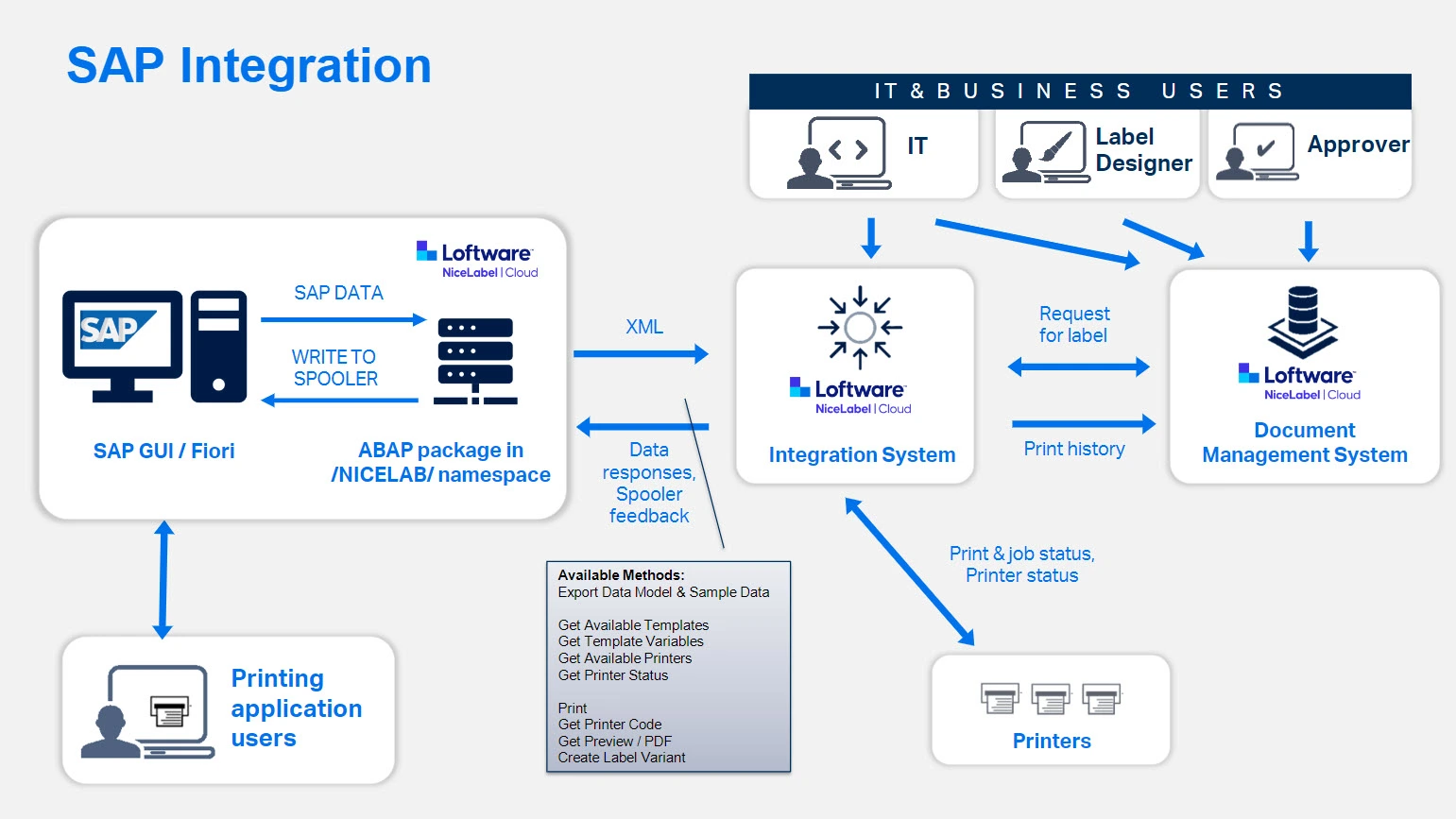
This integration through the ABAP package is intended for SAP customers without GLM+, on-premise or in a private cloud. Loftware communicates using XML over a web service (SOA) or HTTP, and exchanges print previews, printer status, variables and print jobs with SAP in two directions.
| Feature | Detail |
|---|---|
| SAP environment | S/4HANA on-premise or private cloud |
| Communication | XML over Web Service (SOA) or HTTP, bidirectional |
| Installation | ABAP transport package, in the SAP system |
| Required | Loftware Cloud Business edition or higher |
Method 4: Loftware SAP integration through BC-XOM
This integration through BC-XOM is intended for SAP customers who want to keep their existing output management infrastructure. Loftware then operates as part of the SAP output management system, through RDI (SAPscript) or XSF (Smart Forms). The status of print jobs goes back to the SAP spooler.
| Feature | Detail |
|---|---|
| SAP environment | S/4HANA on-premise or private cloud, SAP ECC 6.0+ |
| Communication | RDI/XSF through SAP output management, print status back to the spooler |
| Installation | Loftware Command Line Interpreter, on the SAP Application Server |
| Required | SAP Basis Administrator; operating system Windows Server, RHEL, SUSE or IBM AIX |
Which Loftware SAP integration fits your organization?
Not only your SAP version determines the choice, but also your cloud strategy:
| Situation | Recommended method |
|---|---|
| S/4HANA on-premise with GLM+ | SAP GLM+ Integration |
| Moving to SAP Public Cloud / BTP | BTP and SAP Public Cloud Integration |
| On-premise without GLM+ | ABAP Integration |
| Keeping the existing output management infrastructure | BC-XOM Integration |
Giesbus analyzes your current SAP architecture and advises which method offers the lowest risk and the fastest implementation.
Other ERP, WMS and MES integrations
Besides SAP, Loftware connects through a standard connector with Oracle and Microsoft Dynamics 365, and through the API with systems such as NetSuite and Odoo. You can find the full overview on our ERP integration page.
Why Giesbus for your Loftware SAP integration?
Giesbus guides your Loftware SAP integration from advice to go-live:
- Certified Loftware Cloud Solutions Expert (LCSE): verify at lcse.giesbus.nl
- More than 20 years of experience and more than 50 organizations supported
- Direct contact with the architect, with no layers in between
- Advice on the right method before you arrange licenses or installation
- Guidance in English or Dutch from analysis to go-live
Frequently asked questions about Loftware SAP integration
Can I print labels from SAP with Loftware?
Yes. You start the print job in SAP and Loftware prints the label. Which of the four connections fits depends on your SAP environment.
Which Loftware SAP integration fits S/4HANA Public Cloud?
For S/4HANA Public Cloud and SAP BTP, the BTP and SAP Public Cloud Integration is the right choice. Loftware installs and configures this REST connection itself.
Can I later switch from the ABAP connection to GLM+?
Yes, as soon as your SAP environment supports GLM+. You then move from the generic ABAP connection to the GLM+ integration. Giesbus guides this switch.
Who installs the SAP side of the Loftware SAP integration?
That depends on the method. With GLM+, ABAP and BC-XOM, your own SAP BASIS administrator installs the SAP side. With the BTP and SAP Public Cloud Integration, Loftware performs the installation itself.
Not sure which Loftware SAP integration fits your environment?
We look at your SAP architecture and advise which method fits, with no obligation.
 Vrieswijk 27
 +31 72 533 2998

 Chamber of Commerce 86756850

 Loftware Cloud Solutions Expert