
How Edough, a producer of premium bakery and patisserie products, fully automated its production labels through a seamless integration between Odoo ERP and Loftware Cloud Essentials, including dynamic ingredient declarations, allergen management and GS1 barcodes.
The challenge: reliable and scalable production labels
Edough was looking for a reliable, error-free and scalable solution for automatically generating production labels. With the growing demand for traceability, complex ingredient declarations and nutritional information, Edough had to fully automate the labeling process, with no operator needing to enter batch data or expiration dates by hand.
Giesbus Labeling Solutions built a complete integration between Odoo ERP and Loftware Cloud Essentials. All label data is now available on the shop floor in real time from the ERP, and manual entry and its error-proneness are a thing of the past.
Project goal
- Fully automated production labels from Odoo master data.
- Eliminating human error by avoiding manual data entry.
- Dynamic processing of complex data: ingredients, allergens, expiration dates and nutritional values.
- A stable and future-oriented connection between ERP and print software.
- Central control of label templates through Loftware Cloud Essentials.
The solution: a seamless technical bridge
1. Real-time connection through CData ODBC
Loftware Cloud Essentials supports databases (ODBC, SQL) as a data source; native API connections are only included in the Cloud Business license. To keep Edough on Cloud Essentials and still achieve a direct, real-time connection with Odoo, we used the CData Odoo ODBC connector. This technology translates Odoo's data models into ODBC tables that Cloud Essentials can read with ease. The result is a stable and affordable connection, without Edough having to upgrade to a more expensive license.
2. Loftware Automation and Print Cockpit
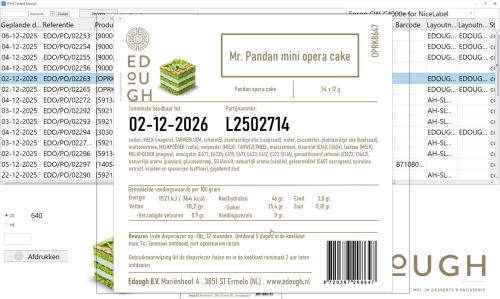
In Loftware Cloud Essentials, we set up an Automation workflow that automatically retrieves the right data as soon as an operator gives a print command. On the shop floor, the operator uses a clear Print Cockpit. The operator only selects the order number or product, and the system immediately fills in the right variables (such as batch numbers and expiration date rules).
3. Smart label templates for the food industry
Giesbus developed advanced templates that meet the strictest requirements in the food industry:
- Dynamic declarations: automatic ingredient lists in multiple languages (Dutch/English).
- Allergen management: automatic highlighting of allergens (bold or capitals) in accordance with EU Regulation 1169/2011.
- Traceability: direct generation of GS1 barcodes and internal lot codes based on Odoo batch data.
- Flexibility: one template for various brands and private labels (such as AH and Jumbo).
4. Integration with production planning
The connection also retrieves all crucial data directly from the Odoo MRP module:
- Production orders and product variants.
- Batch and lot numbers and specific expiration date calculations.
- Recipes, ingredients and the associated nutrition tables.
The result: error-free production labels at scale
The integration between Odoo and Loftware Cloud Essentials delivers four concrete benefits for Edough:
- One source of truth: all product data comes directly from Odoo, so ingredients, allergens, nutritional values and batch data are always up to date on the label.
- Less manual handling: operators only select the order number or product, and the system does the rest.
- Compliance in order: allergen marking in accordance with EU 1169/2011, GS1 barcodes and multilingual ingredient lists are applied automatically.
- Scalability: new brands, private labels or language variants are added to the same template, with no reconfiguration needed.
Frequently asked questions about Odoo and Loftware Cloud Essentials
What is the CData Odoo ODBC connector?
The CData Odoo ODBC connector is a technology that translates Odoo's data models into ODBC tables. Loftware Cloud Essentials supports ODBC databases as a data source (API connections are only included in the Cloud Business license), so through this connector, Cloud Essentials can still read real-time data from Odoo. For Edough, this means a stable, error-free connection between ERP and label software, without needing a more expensive license.
How do you connect Odoo to Loftware Cloud Essentials?
The connection works through the CData Odoo ODBC connector as a data source and Loftware Automation as the trigger engine. At Edough, a workflow automatically retrieves the right production, batch and recipe data as soon as an operator gives a print command through the Print Cockpit. The operator selects the order number, Loftware retrieves everything from Odoo in real time and prints the right label.
What is a Print Cockpit in Loftware Cloud Essentials?
The Print Cockpit is the operator interface within Loftware Cloud Essentials where employees print the right label with a few clicks. Giesbus fully customizes the interface: at Edough, the Print Cockpit only shows the relevant orders and products, and the system then automatically fills in all dynamic fields, such as allergens, expiration date, batch number and GS1 barcode, based on Odoo data.
Which data sources does Loftware Cloud Essentials support?
Loftware Cloud Essentials can retrieve data from databases through an ODBC connection, and you can use any database or application available as an ODBC source. For API connections such as REST or web services, you need the Cloud Business license. At Edough, we expose Odoo through the CData ODBC connector as an ODBC table, so Cloud Essentials can read the production, batch and recipe data in real time without an upgrade to Cloud Business.
Curious how your organization can also automate labeling processes by connecting your ERP system, such as Odoo, NAV or NetSuite, to Loftware? Contact Giesbus.
→ See which ERP connections are possible
Read these cases too
- Edex Food: GS1-compliant pallet labels with Dynamics 365 Business Central and Loftware Cloud.
 Vrieswijk 27
 +31 72 533 2998

 Chamber of Commerce 86756850
 Loftware Cloud Solutions Expert