Is your organization still working with NiceLabel Designer Express, Designer Pro or PowerForms to design and print labels? Loftware, the manufacturer behind NiceLabel, is focusing all future development on Loftware Cloud. Below we answer the most frequently asked questions about moving from NiceLabel Designer to Loftware Cloud, from what changes functionally to how the license works.
Do you work with a NiceLabel LMS or Control Center server environment? Then see our FAQ on the LMS to Loftware Cloud migration.
Why move from NiceLabel Designer to Loftware Cloud?
Perpetual licenses for Designer Express and Designer Pro are no longer available; you can keep using existing licenses as long as Loftware's Product Lifecycle Policy allows it. All new functionality, improvements and innovation are now developed exclusively in Loftware Cloud. You also manage your label environment through the browser, without your own servers, and automatically benefit from updates without having to upgrade yourself.
Which Loftware Cloud edition fits my current NiceLabel version?
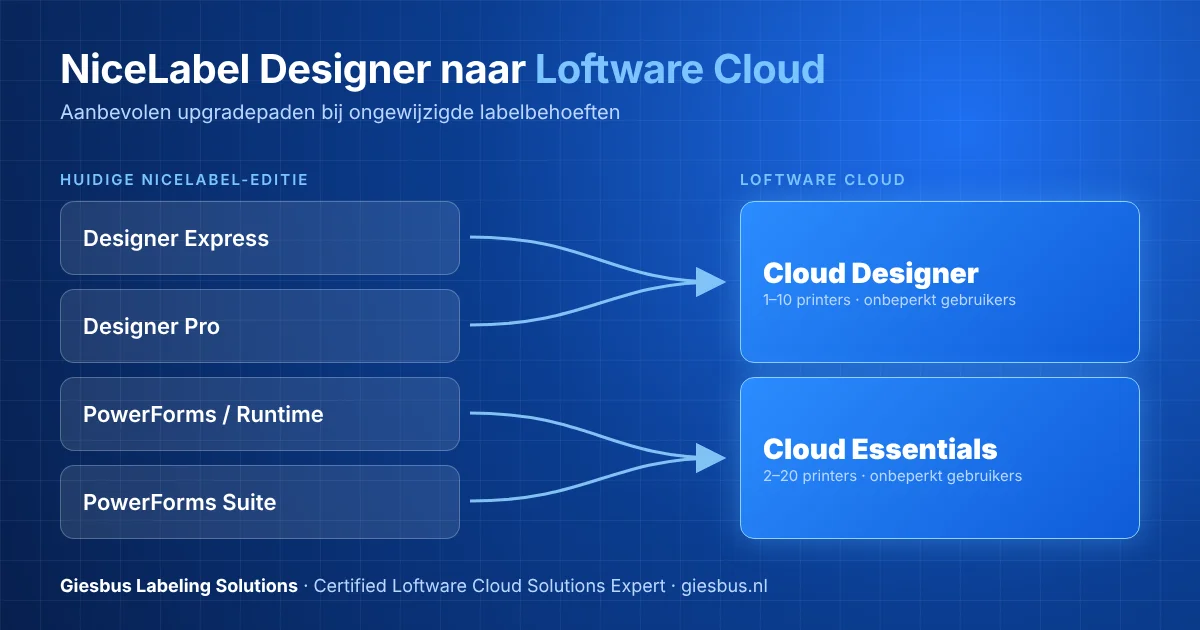
That depends on the product you use now. The overview below shows the recommended upgrade paths, assuming your labeling needs stay the same:
| Current NiceLabel edition | Loftware Cloud equivalent | Number of printers |
|---|---|---|
| Designer Express | Cloud Designer | 1-10 |
| Designer Pro | Cloud Designer | 1-10 |
| PowerForms / PowerForms Runtime | Cloud Essentials | 2-20 |
| PowerForms Suite | Cloud Essentials | 2-20 |
Not sure which edition? See our detailed comparison of the Loftware Cloud editions.
What changes functionally when I move from NiceLabel Designer to Loftware Cloud?
All your existing NiceLabel functionality is retained, and Loftware Cloud adds to it: a web designer to design labels directly in the browser, secure centralized cloud document storage, access from any location and any computer, and improved label security with draft and published statuses. If you used PowerForms, you also get printing from the browser, print history, role-based access, an approval workflow and label version control.
How does the Loftware Cloud license work?
Loftware Cloud uses a subscription with printer-based licensing: the number of users is unlimited, and you pay based on the number of printers you print labels with. If you add a printer later, you can do so at any time at a pro rata price; unlike the perpetual NiceLabel licenses, you do not have to buy additional printers in bundles of five. Subscriptions are paid 12 months in advance and renewed automatically through your certified Loftware reseller.
Can I keep using my existing label templates?
Yes. You can reuse your existing label files in Loftware Cloud without any problem, including older NiceLabel formats such as .lbl from versions 5 and 6. Open the label once in the new designer and save it in the current .nlbl format, and you can continue right away. So no label conversion is needed.
Can I keep working without an internet connection?
Yes, to a certain extent. You can design labels with a locally installed designer if your internet connection fails; this is supported for up to 30 days, after which an internet connection is needed to revalidate your license. Printing also remains possible during an outage, as long as your label templates and data are available locally. The Loftware Cloud desktop applications must connect to the Control Center at least once every 30 days to verify your subscription.
Do I have to convert my license to Loftware Cloud right away?
No, not necessarily. Now is a good time to plan and prepare the move, though: support for NiceLabel desktop products remains available as long as the Product Lifecycle Policy indicates, but Loftware Cloud is the basis for all future innovation. You can also use NiceLabel and Loftware Cloud side by side during the transition, while you set up your labels and processes in Loftware Cloud.
Is a trial period available?
Yes, you can request a trial period for all Loftware Cloud editions. After you sign up, a Loftware sales representative or a certified Loftware reseller such as Giesbus contacts you before the trial environment is set up. Once active, you are up and running with Loftware Cloud within minutes: after activation you get access to the Control Center web app, install the desktop app and can get started right away.
Why Giesbus for your move to Loftware Cloud?
As a Certified Loftware Cloud Solutions Expert (verify at lcse.giesbus.nl), Giesbus guides you personally through the move from NiceLabel Designer to Loftware Cloud, from choosing the right edition to a smooth go-live. With more than 20 years of experience and more than 50 organizations supported, we know exactly what changes functionally and in terms of licensing, so you are not faced with surprises. See also our pages on Loftware Cloud Designer and Loftware Cloud Essentials.
Would you like to know in advance what the move costs and how long it takes? See our migration package with a fixed price.
Would you like to know which Loftware Cloud edition fits your organization and what the move involves in concrete terms? We are happy to think along with you, with no obligation.
 Vrieswijk 27
 +31 72 533 2998

 Chamber of Commerce 86756850
 Loftware Cloud Solutions Expert