Is your labeling starting to pinch: more and more label templates, multiple print locations, customers with their own requirements or regulations that demand control? Then you will soon come across the term label management system, or LMS for short. Below we explain what a label management system is, how it differs from ordinary label software and when you need one.
What is a label management system (LMS)?
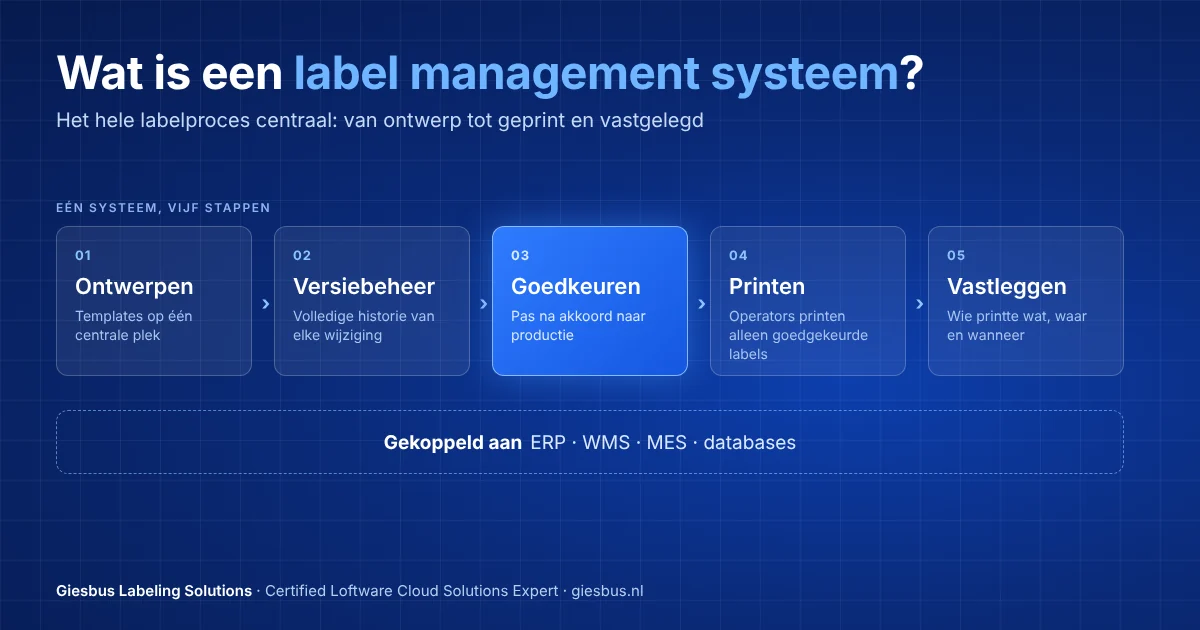
A label management system is software that lets you manage the entire labeling process centrally: designing, storing, approving, printing and recording. All label templates are in one place, each user only gets the rights that match their task, and on the shop floor only approved labels and controlled data are printed. An LMS also connects to your business systems, so labels get their data directly from the ERP or WMS, for example.
What is the difference between label software and a label management system?
With standalone label software, such as a designer on one PC, you design and print labels locally. That works fine for one department or a few printers. A label management system adds central management: one store for all templates with version control, an approval step before a change goes into production, management of printers and users, and insight into what was printed where. So the difference is not in the designing, but in the control over the entire process.
When do you need a label management system?
An LMS pays off as soon as the risks or the workload of manual label management become too great. If you recognize one or more of these situations, an LMS is worth considering:
- Label templates are scattered across PCs, network drives or sites, and no one knows for sure which version is the right one.
- Label changes are approved by email, or not at all.
- You print at multiple locations or production lines and want the same label to come out of the printer everywhere.
- You work in a regulated industry, such as pharma, medical devices, chemicals or food, and must be able to show who changed and printed what.
- Label data is retyped by hand, even though it is already in your ERP, WMS or database.
What are the components of a label management system?
At Loftware, the heart of the LMS is the Control Center, a web application for management. The main components are:
- Central document storage with version control: all labels in one place, with the full history of every change and the option to restore an earlier version.
- Approval workflows: a change only goes to production after an authorized colleague has approved it.
- Users and roles: designers design, approvers approve and operators only print.
- Controlled printing: through print applications and web printing, operators only print approved labels with controlled data, without being able to change the design.
- Printer management and reports: an overview of printers, print activity and errors, for compliance and process improvement.
- Integration and automation: connections with ERP, WMS and MES, and automatic printing based on triggers with Loftware Automation.
Is a label management system available in the cloud and on-premise?
Yes. Loftware NiceLabel LMS Pro and LMS Enterprise run on your own servers and include the Control Center. Loftware Cloud gives you the same principles as a SaaS solution: the Control Center runs in the cloud and you do not need to manage servers yourself. Which form fits depends on your IT policy, your locations and your availability requirements. Already working with an on-premise LMS? Then see what a move from LMS to Loftware Cloud involves.
Which Loftware system fits my organization?
That depends on the number of printers and locations, the level of integration you need and your compliance requirements. You can see the cloud editions side by side in the comparison of the Loftware Cloud editions. We are happy to help you choose.
How does Giesbus help with a label management system?
Giesbus is a Certified Loftware Cloud Solutions Expert (verify at lcse.giesbus.nl) and has supported more than 50 organizations with their labeling solution. We map your current labeling process, advise on the right edition, set up the workflows and roles and connect the system to your ERP or WMS. Read how we connect label software to your ERP.
Would you like to know whether a label management system is right for your organization? We are happy to think along with you, with no obligation.
 Vrieswijk 27
 +31 72 533 2998

 Chamber of Commerce 86756850
 Loftware Cloud Solutions Expert